Handbrake is a very powerful tool for doing video conversion. It's also fast, easy to use, and doesn't contain a bunch of fluff to convince you that it has more features then it needs. The presets make using this app dead simple. It will also backup your DVD's or Blu-Rays giving you the option to select the chapters and audio tracks. There are many more features available that I have no idea how to use but I'm sure is useful to someone a lot smarter then me.
Labels
- Android (12)
- Build Guide (1)
- Hardware (11)
- Linux (4)
- News (29)
- Opinion (15)
- Software (15)
- Techni-LOL (3)
- Tutorial (23)
Showing posts with label Software. Show all posts
Wednesday, September 4, 2013
[Software] Handbrake
Handbrake is a very powerful tool for doing video conversion. It's also fast, easy to use, and doesn't contain a bunch of fluff to convince you that it has more features then it needs. The presets make using this app dead simple. It will also backup your DVD's or Blu-Rays giving you the option to select the chapters and audio tracks. There are many more features available that I have no idea how to use but I'm sure is useful to someone a lot smarter then me.
Saturday, May 18, 2013
[Software] Convert Your MP4 Videos To MP3 Audio
Do you have downloaded YouTube video or videos in MP4 format that you just want the audio from? This app is an easy to use must have app. Its called "Convert MP4 to MP3". A simple name for a simple application and it does exactly as the name details.
As you can see from the screenshot below, Convert MP4 to MP3 is layed out very simply. No reason to have to hover over a bunch of buttons or reading instructions trying to figure out how to do the exact task the app says it does. I highly recommend this app if you download videos online which more then likely are in a MP4 format. Works great for music videos, video podcasts, or whatever else you can think of.
This app is completely free and free of tag along apps that auto install to your computer. Go download this app at Convert MP4 to MP3.
As you can see from the screenshot below, Convert MP4 to MP3 is layed out very simply. No reason to have to hover over a bunch of buttons or reading instructions trying to figure out how to do the exact task the app says it does. I highly recommend this app if you download videos online which more then likely are in a MP4 format. Works great for music videos, video podcasts, or whatever else you can think of.
This app is completely free and free of tag along apps that auto install to your computer. Go download this app at Convert MP4 to MP3.
Saturday, December 8, 2012
[Software] Paint.net
This is a new weekly article where I pick an application that I feel is worth at least checking out. The first merges the simplicity of Microsoft Paint and power of The Gimp into one handy little app that makes you wonder why Microsoft doesn't package this into Windows themselves. It goes by the name Paint.Net and is great for doing any type of pictures that requires graphic manipulation which is something that paint just lacks in. But if you've ever sat down to Photoshop or Gimp, you'll know those two programs are not easy to pickup or intuitive to the new user.
I love this program for its many features that normally you would have to pay for which makes this app even better. This app comes in at the low great price of free. Really can't beat that. It also has a plugin and add-on feature that you should be able to find on their community but I can't comment on that because I really haven't needed them yet.
If you like to do quick little image edits and often find that MS Paint lacks some key features and the image editing suites or either to expensive or hard to use I highly recommend this app. Go see for yourself at Download Paint Net.
Edit: In case you didn't figure it out, I forgot to mention this is a Windows only app.
| Paint.net has enough features to get the job done. |
If you like to do quick little image edits and often find that MS Paint lacks some key features and the image editing suites or either to expensive or hard to use I highly recommend this app. Go see for yourself at Download Paint Net.
Edit: In case you didn't figure it out, I forgot to mention this is a Windows only app.
Thursday, November 15, 2012
[Software] The Best Linux Emulators 2012
Do you got an itch to play some of those games that you so fondly remember as a child knee high to a grasshopper? Emulators is where it's at. With emulators you can turn your Linux desktop into a Nintendo Entertainment System, Sega Genesis, Atari 2600, or almost any other console, DOS environment, or arcade cabinet you can think of. Below I compiled what I think is worth your time for each of the main system and linked you to the website.
I chose each of these emulators based on popularity. Why popularity? Because the more popular it is in the open source community, the better your chances of getting updates, fixes, and support. Also there's a good chance that it will be a packaged version ready to download for the different Ubuntu / Debian desktops out there. I would recommend that you start with your software center or package manager before googling. If you can't find it then head over to the PlayDeb website and add it from there. (You will have to add the PlayDeb repository once, but after that everything on playdeb should show up in your software center.) Quick disclaimer from my legal department, lol. Emulators aren't an exact science yet. That means while these should work in theory but not all games and roms will run the way they're supposed to. Google my friends. Happy gaming!
Playstation 2
pcsx2
Playstation 1
pcsx
Nintendo 64
mupen64plus
Super Nintendo
zsnes
Gameboy Color
gngb
Nintendo DS
desmume
Gameboy Advance:
vba-m
Gamecube / Wii / Triforce
dolphin
Sega Genesis / MegaDrive
gens/gs
Sega Saturn
yabause
Atari 2600
stella
Arcade
mame
** UPDATE **
I couldn't get bsnes to recognize most of my Super Nintendo roms and zsnes is only available for 32bit Linux. So here's a ling to install snes9x-gtk. This will work on 64bit Linux.
https://launchpad.net/~bearoso/+arch...ric1_amd64.deb
I chose each of these emulators based on popularity. Why popularity? Because the more popular it is in the open source community, the better your chances of getting updates, fixes, and support. Also there's a good chance that it will be a packaged version ready to download for the different Ubuntu / Debian desktops out there. I would recommend that you start with your software center or package manager before googling. If you can't find it then head over to the PlayDeb website and add it from there. (You will have to add the PlayDeb repository once, but after that everything on playdeb should show up in your software center.) Quick disclaimer from my legal department, lol. Emulators aren't an exact science yet. That means while these should work in theory but not all games and roms will run the way they're supposed to. Google my friends. Happy gaming!
Playstation 2
pcsx2
Playstation 1
pcsx
Nintendo 64
mupen64plus
Super Nintendo
zsnes
Gameboy Color
gngb
Nintendo DS
desmume
Gameboy Advance:
vba-m
Gamecube / Wii / Triforce
dolphin
Sega Genesis / MegaDrive
gens/gs
Sega Saturn
yabause
Atari 2600
stella
Arcade
mame
** UPDATE **
I couldn't get bsnes to recognize most of my Super Nintendo roms and zsnes is only available for 32bit Linux. So here's a ling to install snes9x-gtk. This will work on 64bit Linux.
https://launchpad.net/~bearoso/+arch...ric1_amd64.deb
Saturday, January 15, 2011
[Software] Tweetdeck for Chromium in Ubuntu
When Ubuntu 10 came out they trumpeted to the high heavens this new idea called the "me-menu". It's the menu that by default is in the top right that contains chat IM, Twitter, Facebook, and Ubuntu One. In theory this was an excellent idea but for me it never really worked out very well.
![]() |
| Me-Menu is where it has my name Michael |
Friday, January 14, 2011
[Software] Possibly the Best Icons on Ubuntu
The defaults icons that came in Ubuntu 10.10 are pretty nice. But they may not be everyones cup of tea. Or you just want to switch them up every once in awhile as to not get bored with your desktop. No matter what the reason is I have come across what I think is the best icon set for Ubuntu to ever.
Wednesday, December 29, 2010
[Ubuntu] Wallpaper Changer on Your Taskbar
Here's a cool way to change your wallpaper with a simple click. I change my wallpaper several times a day. This seems to be the medicine for those of us who have wallpaper attention deficit disorder.
Check out the original article by Joey Sneddon on OMG! Ubuntu!
Indicator-wallpaper changer anyone?
By Joey Sneddon, posted December 29, 2010
It seems there are more ways to change desktop wallpaper in Ubuntu than there are wallpapers.
DesktopNova is another tray-based tool for switching between wallpapers but one which , thanks to Michael Otto (who has also made a Virtualbox indicator), now has a shiny application indicator to control it with.
Install
Installation via PPA sound good? Add ppa:michael-astrapi/ppa to your software sources or open a terminal and run the following command: -
sudo add-apt-repository ppa:michael-astrapi/ppa
The following command will install the required app and indicator: -
sudo apt-get update && sudo apt-get install desktopnova indicator-desktopnova
Get it working
First configure Desktop Nova via Applications > Accessories > DesktopNova. Choose a folder full of wallpapers, enable the ‘GNOME 0.2′ module, hit the save button followed by the ‘start daemon’ button.
The Indicator can be launched from the ‘Applications > Accessories’ sub-menu.
Check out the original article by Joey Sneddon on OMG! Ubuntu!
Wednesday, December 15, 2010
Screenshots of Games Working Under Ubuntu 10.10
If there's one thing that's going to keep people from migrating over to Linux, it's games. Generally Linux doesn't compare to the amount and quality of games that Windows can provide. But that's changing by the day. Many games are now supported under Wine (not emulator but environment).
Saturday, September 4, 2010
Convert Videos For Your Android or iPhone With Linux Easily
For you Linux and specifically Ubuntu users out there here's a nice little app that will take care of your video converting needs.
Tuesday, May 25, 2010
Alternative Linux Software
Last post I wrote about how Ubuntu is perfectly easy way to step out of the Windows world and why I feel it's a great alternative. Now that you have Ubuntu loaded and your ready to go, there's no doubt that you will soon find that you are in need of some software that you used in Windows. But how do you go about finding what the equivalent or alternative is to your Windows counterpart? Below I have posted a list of sites that I found useful.
- 50 Linux Alternatives
- Linux.alt
- Linux.ie
- Computer World (Choose your Linux distribution as opposed to Windows 7)
- Google (Google. The software is free after all :^)
Saturday, November 7, 2009
What does your desktop look like?
I’m always interested in what others are doing with their desktops. Send me a screenshot along with your name or chosen username and I will post it online.
michael.malott@gmail.com
**One of many products you can use to screen capture with. Screen Capture Software**
michael.malott@gmail.com
**One of many products you can use to screen capture with. Screen Capture Software**
Sunday, October 25, 2009
Linux As Another Choice To Win7
Here are some resource I have found for those that may want to give Linux a try. Linux can be a great way to restore that aging dinosaur of a PC sitting in the corner or alternative to Windows 7. Alternative doesn’t mean 2nd grade product though. Below are some links to help you get started in Linux. If your a Linux newcomer I highly recommend using Ubuntu or Kubuntu. These two distributions of Linux are very Windows like and the degree of “change” is very little.
How To Try Ubuntu Linux
Five Linux Alternatives to Windows 7
Ubuntu 9.10
Kubuntu 9.10
Links
How To Give Linux a TryHow To Try Ubuntu Linux
Five Linux Alternatives to Windows 7
Videos
I have posted up some videos demonstrating Ubuntu and Kubuntu below.Ubuntu 9.10
Kubuntu 9.10
TIP: Facebook Quick Post Bookmark
Do you find that you are always coming across content on the internet that you have to post to Facebook? Here’s a to get a button in your bookmarks bar or your bookmarks folder if you choose so that posting content that you find becomes even more quick and easy. This will work in any browser.
Firefox or Chrome
Drag the link below to your bookmark bar if you’re using Firefox or Chrome.Facebook.it
Internet Explorer
If you’re using Internet Explorer then right click the link and select “Add to Favorites…”. From there you can add the shortcut by clicking the Favorites star at the top of Internet Explorer.Now click the down arrow next to “Add Favorites”.
Go down to “Organize Favorites” and click it. This will bring up a new window. Find your Facebook.it bookmark and click the “Move” button at the bottom.
Then click the “Links” folder and “OK”. It should appear in your favorites bar now.
Using the Facebook Link
Anytime you come across a page, picture, or whatever that you want to share with your Facebook, you just have to click the Facebook button and it will automatically post to your profile. If you aren’t logged in at the time, it will prompt you for your username and password. Just check the “keep me logged in” box on the login screen, then you can quickly post content until you log out of Facebook.Friday, October 23, 2009
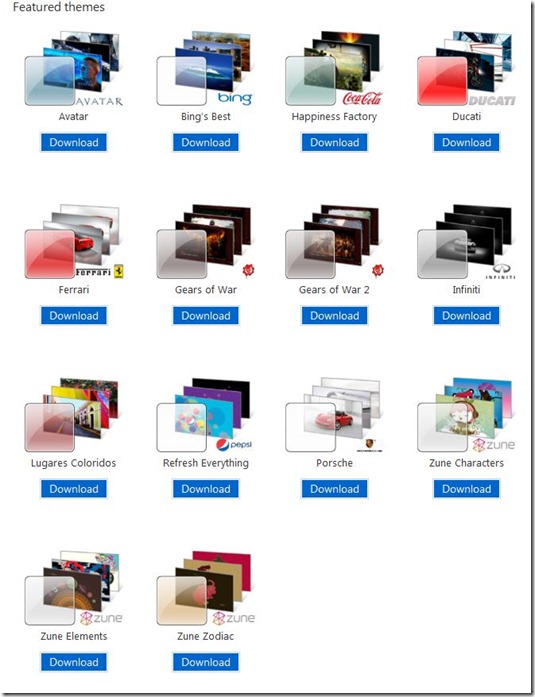
New Windows 7 Themes
For those of you brave enough to tread into the Windows 7 territory already, there are new themes available from Microsoft. They include Avatar, Bing, Coca-Cola, Ducati, Ferrari, Gears of War 1&2, Infiniti, Pepsi, Lugares Coloridos, Porsche, Zune Characters, Zune Elements, and Zune Zodiac. Go to the official Windows 7 Theme page, download, click, and enjoy.
Wednesday, October 21, 2009
Google Chrome 3
I like to consider myself somewhere in between a bleeding edge and outside the norm type of user when it comes to computers. So when I happened upon an article reviewing the new features of Google’s Chrome 3, I decided to give it a try… again.
I did try Chrome when it was released and was very unimpressed. It struck me as Firefox without the frills. Don’t get me wrong, that isn’t a bad thing, but why switch from what works to the other side that is a “knock-off”.
noticed was the “New Tab” screen. This screen presents you with the sites you most visited as screen shots and recently closed in chronological order below that as a list. This feature is pretty nice and makes me wonder how I lived without it before. Note that you can add this functionality in Firefox via plug-ins but it’s good to have built in as part of the browser.

Bottom line is that Chrome is a late comer to the browser game. Although it is a very nice attempt at offering an online interaction experience that is different, it has a lot of ground to makeup. Is it worth trying. Yes. Will it replace your current browser? Probably not for most people but is probably great for minimalist and people who have a panic attack if they're browser doesn't load fast enough.
------------------------------------------------------------------------------------------------------------------------
Here’s a video walking through Chrome 3 and some of it features. This video was done by mvkVirtual who has an awesome English accent.
Leave me a comment if you like Chrome, hate it, never will try it, or whatever else you have to say.
I did try Chrome when it was released and was very unimpressed. It struck me as Firefox without the frills. Don’t get me wrong, that isn’t a bad thing, but why switch from what works to the other side that is a “knock-off”.
Initial Reaction
Earlier this week, I dove in and installed the latest incarnation of Chrome. The install was typical and easy. It installed without a hitch and asked if I would like to import my Firefox bookmarks. I did this and it even put my bookmark toolbar in the same place as Firefox. Once installed, one of the first features Inoticed was the “New Tab” screen. This screen presents you with the sites you most visited as screen shots and recently closed in chronological order below that as a list. This feature is pretty nice and makes me wonder how I lived without it before. Note that you can add this functionality in Firefox via plug-ins but it’s good to have built in as part of the browser.
System Resource Usage
Being that I’m very aware and somewhat obsessive about system resource usage, I then immediately proceeded to check Chrome’s memory and CPU use. While looking through the process list in the Windows 7 task manager, I soon noticed that Chrome was running multiple processes. Like Internet Explorer 8, it runs each tab as a separate process. This benefits the user considerably because when you close a tab, it’s like closing a program releasing system resources with it. It also means that if for some reason a web page freezes up your system, your not forced to close the whole browser and possibly loosing where you were. Comparing Chrome with Firefox and IE8 as far as memory usage, they all came up about equal, give or take. Not enough to weigh a decision in the favor for one over the other if you have anything that resembles a modern computer.Browsing
One of the first thing you’ll notice while using Chrome is that it is very slick and minimal in the approach of appearance. There aren’t army of icons that IE8 throws at you or the endless amount of options and customization Firefox allows for. Now to try out actually surfing the internet with this shiny new browser. I typed in www.xbox.com/forums which I know to load slowly in other browsers to test out loading speeds. Just like in IE8 and Firefox the Xbox forums site also tripped up while loading a bit. Deciding that maybe that wasn’t fair test considering the site I aimlessly browsed a handful of other sites such as Digg, YouTube, and Facebook. Chrome loaded these sites in my opinion a lot faster than IE8 and a little faster than Firefox. After a couple of hours of using Chrome I decided it felt noticeably smoother than the other browsers also.Conclusion
Going into Chrome, I didn’t think that I would like this browser based on past experience. Now after about a week of using it along side Firefox (I don’t usually use IE8), I’m a lot more impressed with it than I thought I would. Mainly it does what a browser supposed to do minus the sugar coating. It simply browses. And does it quickly. I haven’t come across a page that Chrome didn’t render correctly myself but it’s a known issue. Otherwise as far as browser go, I think the latest version of Chrome is much great. Now for the million dollar question. Is it worth switching from Internet Explorer 8 or Firefox? If you’re using IE8 exclusively then your probably not reading this anyways. IE8 fails at so many things in my opinion I won’t get into them all here. In comparison to Firefox though it gives it a good run for its money. Really here, I think it will come down to user preference. If you fancy yourself a power user and need the Firefox plug-ins to do certain tasks or have just grown attached to them like so many others then you might want to check out Chrome but may find yourself quickly going back to Firefox. If you need a browser to just email, browse, and do social networking, Chrome is worth checking out. Actually the biggest strike against Chrome at this point in the game is the lack of plug-ins. If Chrome had a plug-in system similar to Firefox or simply allow Firefox plug-ins then I think they would convert a lot more people over to their browser.Bottom line is that Chrome is a late comer to the browser game. Although it is a very nice attempt at offering an online interaction experience that is different, it has a lot of ground to makeup. Is it worth trying. Yes. Will it replace your current browser? Probably not for most people but is probably great for minimalist and people who have a panic attack if they're browser doesn't load fast enough.
------------------------------------------------------------------------------------------------------------------------
Get Google Chrome 3. –>->Google Chrome<-<-
------------------------------------------------------------------------------------------------------------------------Here’s a video walking through Chrome 3 and some of it features. This video was done by mvkVirtual who has an awesome English accent.
Leave me a comment if you like Chrome, hate it, never will try it, or whatever else you have to say.
Subscribe to:
Posts (Atom)